

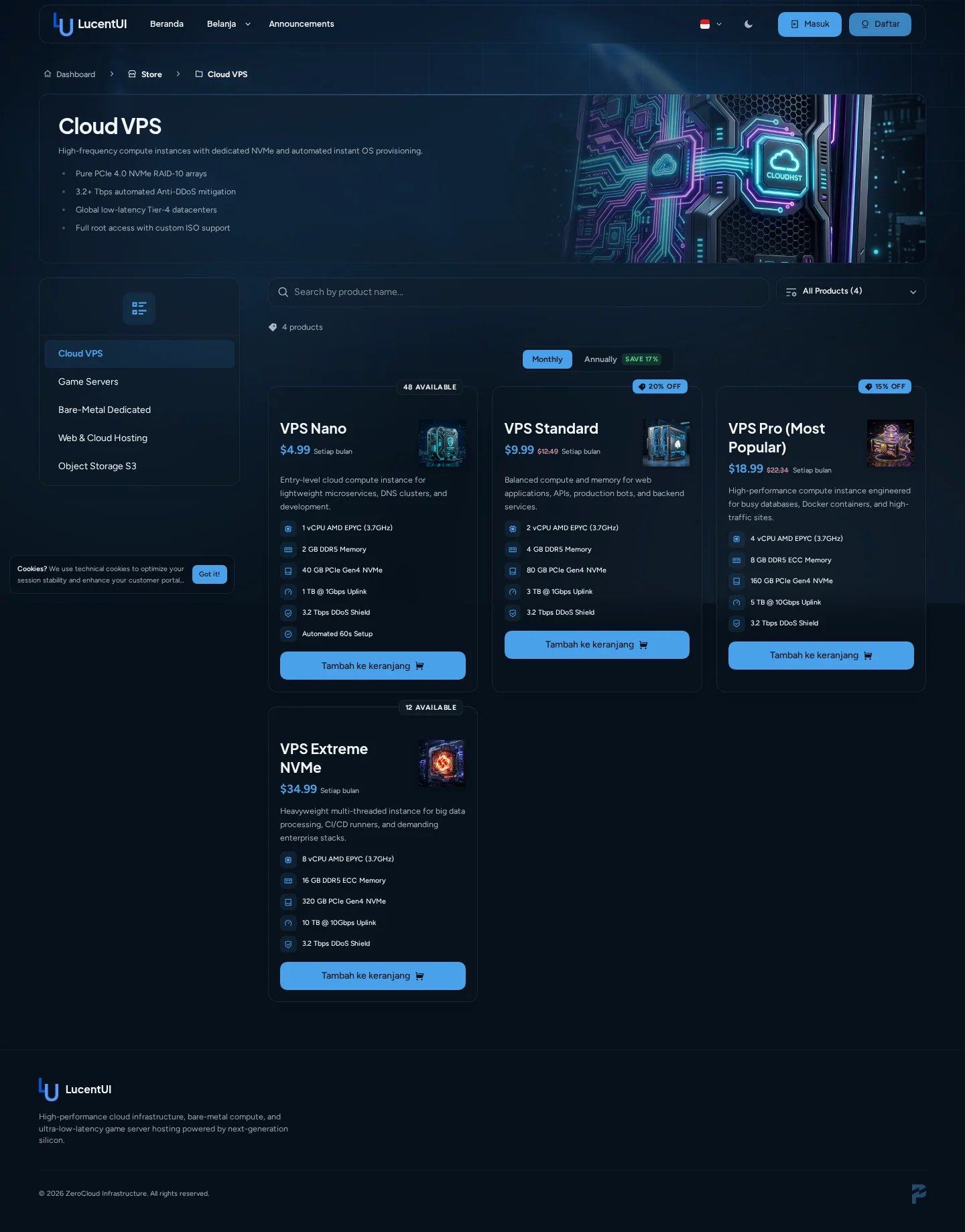
Cloud VPS category using product spec shortcodes and a dark Lucent palette.
Product card styles
The Editor includes six card presentations: Classic, Background, Icon Compact, Icon Right, Icon Top-Left, and Icon Top. All variants render the same pricing, stock, discount, CTA, cleaned description, and parsed specification data.Product behavior
- Direct Checkout skips the product detail page.
- Show Starts at Label controls the small price prefix.
- Show Category Image Banner uses the category media as a wide header.
- Show Category Descriptions controls text on subcategory cards.
- Full Description in the Banner switches between complete formatted copy and a compact excerpt.
Specification shortcodes
Add one marker per line to a Paymenter product description:!key=value.
Common keys include cpu, ram, memory, storage, disk, network, bandwidth,
location, region, ddos, database, email, domain, ssl, and setup.
Unknown keys still render with a safe fallback icon.
Pricing metadata such as discount, discountpercent, and popular_plan is excluded
from the hardware specification list.
Scoped icon mappings
When two extensions reuse the same numeric value, a global ID is ambiguous. Add a scope in Icon Mapping:
Then provide the value ID and either a complete icon URL or a filename from the LucentUI
icon asset directory.